Device layer

Device manager

A device is not an address. In Melanite it's a profiled entity with capabilities, a stable identity that survives a rename or a new IP, a bindable namespace of named values — and a palette node that appears by itself.

Status Shipped

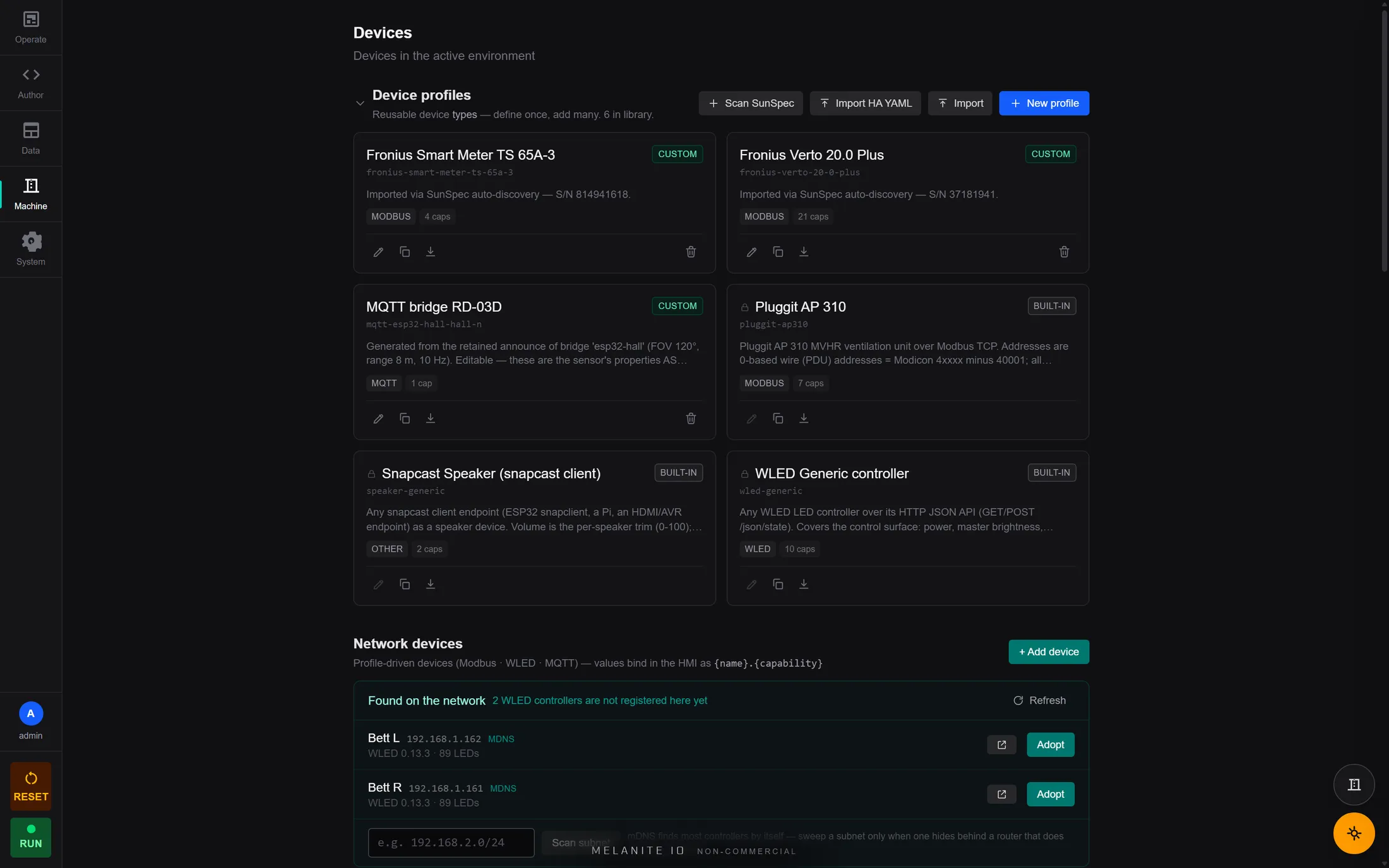
The Melanite device manager listing profiled devices — two Fronius inverters, an MQTT bridge, a Pluggit ventilation unit, a Snapcast speaker and a WLED controller — plus two controllers found on the network awaiting adoption.
Inverters, ventilation, speakers and LED controllers under one profile model. Two more were discovered on the network and are waiting to be adopted.

In one line

The device manager is one unified model — capability, profile, protocol, transport — behind every kind of device Melanite talks to. Add a device on the /devices page, author its profile in-app (by hand, by probing the live registers, by importing a Home Assistant Modbus YAML, or by letting an announced device generate its own), and it immediately provides named variables you can bind, a node that appears in the palette automatically, live values on the page, and charts and logging for free.

Capabilities

One model for every device

EtherCAT slaves, Modbus units, MQTT sensors, WLED controllers, cameras, speakers and fleet devices all ride the same capability/profile/protocol/transport split — so adding a protocol adds devices, not a parallel universe.

Author profiles on-device

A register-map editor, a live register probe that reads the real device while you map it, Home Assistant Modbus YAML import, SunSpec auto-discovery, and profile export/import. No JSON in an editor, no restart.

Device-backed variables

A device auto-populates a bindable namespace of named values. Write-on-change plus ownership coupling solves the classic problem where an operator slider and an automatic loop fight over the same register.

Nodes appear by themselves

Add a device and its node shows up in the palette — modbus:, mqtt:, ethercat:, camera:, sensor: and fleet: nodes are generated from the profile, so there is nothing to wire up by hand.

Not just numbers

A capability can be a whole collection, not a pile of scalars: a sensor that reports many readings at once delivers them as one first-class value.

Live on the page

Room chips, inline test controls, per-device sparklines, live value grids, network discovery, identity-preserving rename, camera preview and calibration — the device page is a working instrument, not a form.

Devices on other devices

Hardware physically attached to another Melanite in the fleet appears as an ordinary device node in your graph, labelled with where it lives.

Worked examples

A ventilation unit nobody documented

An HVAC unit speaks Modbus, but the manual is a PDF of a register table.

How

Open the register-map editor, point the live probe at the unit, and read real values while you name and scale them. The finished profile becomes a device with named variables, a palette node, charts and HMI bindings — and you can export it so the next unit takes thirty seconds.

Bring a Home Assistant config across

You already have a working Home Assistant Modbus YAML for an inverter.

How

Import the YAML. The register map, data types and scaling come straight across into a Melanite device profile — the device is live in the graph without retyping anything.

Why Melanite

Most controllers make a device an address and a data type in your program, so renaming or replacing it means editing logic. Melanite makes the device an entity with a stable identity and a profile you author on the device itself — and the profile, not your program, carries the protocol detail.

FAQ

Do I have to edit config files?

No. Everything — adding a device, authoring its register map, probing it live, importing a Home Assistant YAML, exporting a profile — happens in the app on the device.

What happens if I rename a device or it gets a new IP?

Nothing breaks. Bindings reference a stable device identity, not a name or an address, so renaming or re-addressing leaves your graph and your HMI intact.

Can two things write the same device value?

The device layer enforces single ownership and writes only on change, which is what stops an operator slider and an automation loop from fighting over the same register — the classic cause of a control that snaps back the moment you let go.

Free, full-featured

Every feature, free for personal use.

One binary runs every tier — the licence only toggles entitlements, never the feature set.